Labels

Monday, March 23, 2015

How do I use Custom domain in my Blogger account

In order to set your domain to your Blogger account, you need to take several simple steps:
 *** Set your domain within your Blogger account.
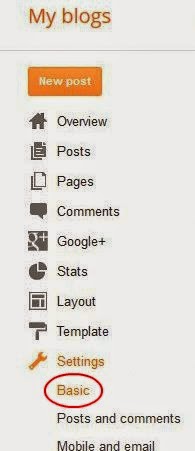
Once you login to your Blogger account you need to click on Settings tab and choose Basic


http://easyblogstrick.blogspot.com/ 


 ***Then you will need to click on Add a custom domain button under Blog

How to Remove a Custom Domain From Blogger

We see a number of questions by users in the Blogger Support Forums about how do they remove a Custom Domain that they had setup for their blog.

It's very easy to switch back to your old blogspot address.

Old Interface
If you are still using the Old Interface, log onto your blog and go to the Settings, Publishing page.

Then click on the Switch to blogspot.com link.


New Interface